
OFFICIAL ANDROID DOWNLOAD

BAJI999 APP

BET, SPIN AND FOLLOW LIVE ACTION ON ANDROID

Install the BAJI999 Android app when you want a dedicated route to cricket markets, live casino tables, slots and fast games. Bangladesh players can use BDT, follow live scores and return to the products they play regularly without starting from a browser tab.

Biometric login can shorten sign-in on a supported phone, while the full website remains the better choice for iPhone users or anyone who does not want to install an APK. Both routes involve real-money risk: set a BDT budget before you deposit or bet.

Play BAJI999 on Your Phone Play BAJI999 On Your Phone

Four Ways to Start Your Mobile Session

BUILT FOR

REGULAR ANDROID PLAY

BAJI999 App Benefits

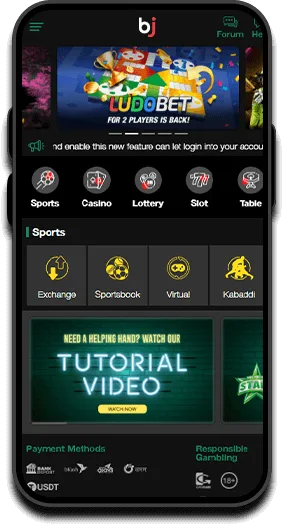
BAJI999 Android app shown on mobile phones
  • Free Official APK Download
  • Biometric Sign-in
  • Live Score Updates
  • Live Betting Access
  • BDT Cashier Access
  • Touch-friendly Game Lobby

APP OR WEBSITE

Choose the Version That Fits How You Play

The BAJI999 app and mobile website lead to the same core betting and casino products. The practical difference is how you launch, sign in and keep the service on your phone.

BAJI999 Android App

Best for regular Android players

  • Launch from an installed app icon instead of finding a browser tab.
  • Use biometric sign-in when your supported device and account allow it.
  • Follow live-score updates while using the dedicated mobile interface.
  • Keep sports, casino, slots and cashier tools in one installed app.
BAJI999 Mobile Website

Best for iPhone and occasional play

  • No APK, installation permission or device storage required.
  • Works through Safari, Chrome and other current mobile browsers.
  • Receives website changes without manually installing an app update.
  • Useful on a shared or secondary device when you sign out afterwards.

Installing the app does not improve odds, RTP or your chance of winning. Choose based on device convenience, not an expectation of better results.

ANDROID APK SETUP

How to Download and Install the BAJI999 App

BAJI999 is supplied as an APK for Android. Menu names differ between Samsung, Xiaomi, Oppo, Vivo and other phones, but the installation flow is usually the same.

  1. 01

    Download from BAJI999

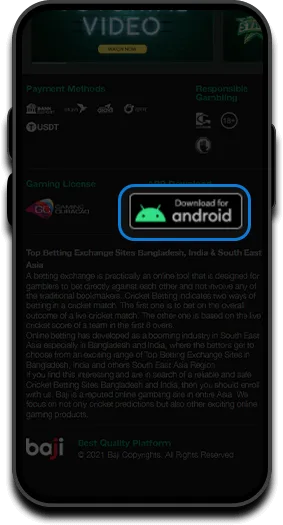
    Tap the official download button on this page. If Chrome or your browser asks whether to keep the APK, confirm only after checking that you started the download from BAJI999.

  2. 02

    Open the downloaded APK

    Use the browser download notification or open Files and check the Downloads folder. Tap the BAJI APK file once; do not install copies sent through an unknown message or file-sharing group.

  3. 03

    Allow this installation source

    If Android blocks the installer, open the permission shown on screen and allow installs from the browser or file manager you used. This is a device setting, not a request for your BAJI999 password.

  4. 04

    Install, open and sign in

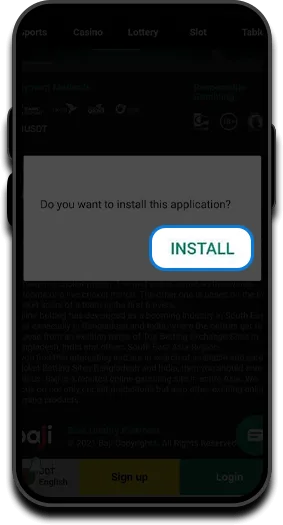
    Return to the installer, tap Install and launch BAJI999. Sign in with your existing details or register with accurate information, then disable the install-source permission if you no longer need it.

Do not switch off Android security tools permanently. The only extra setting normally needed is temporary permission for the browser or file manager to install the APK you selected.

IPHONE AND IPAD

Use BAJI999 Through Safari on iOS

The download offered here is for Android. On iPhone or iPad, use the BAJI999 mobile website through Safari instead of trying to install an Android APK.

For a home-screen shortcut, load BAJI999 in Safari and use Share, then Add to Home Screen. The shortcut still opens the website, so no separate iOS package or installation permission is required.

  1. 1

    Open BAJI999 in Safari and sign in only after checking the address.

  2. 2

    Tap the Share icon in Safari.

  3. 3

    Choose Add to Home Screen and confirm the shortcut name.

  4. 4

    Use the new icon to return to the mobile website.

SAFE APK HABITS

Check the Download Before You Install

An APK can install software outside Google Play, so the source matters. Use the BAJI999 download flow and protect your account during setup.

Use the official download

Avoid APK libraries, shortened links from strangers and modified “bonus” versions. They may be outdated or designed to capture login details.

Review Android warnings

Android may warn that the file can be harmful because it came from outside Play Store. Confirm that you initiated the BAJI999 download before continuing.

Protect account credentials

Installation never requires you to send a password, payment PIN or one-time verification code to another person.

Lock your phone

Use a device PIN or biometric lock, sign out before lending the phone and do not let anyone under 18 use the app or account.

LATEST VERSION

How to Update the BAJI999 Android App

When BAJI999 asks for an update, return to the official download page and download the current APK. Open it and install over the existing version when Android offers an update; your device may ask for the same source permission again.

If an update will not install, close BAJI999, confirm that enough storage is available and remove an incomplete older APK from Downloads before trying again. Do not uninstall the working app until you know your login details and have checked official support guidance.

INSTALLATION HELP

Fix Common BAJI999 App Problems

Most APK issues come from browser permissions, an incomplete download, low storage or an old file. Work through the relevant check before downloading repeatedly.

Download does not start

Allow downloads for the browser, check your connection and available storage, then tap the official button once. Look in Downloads before starting another copy.

“App not installed” appears

Delete the incomplete APK, download a fresh copy and confirm Android has enough free storage. A conflicting or much older package may require official support guidance.

Install button is blocked

Allow installs from the exact browser or file manager opening the APK. On some phones, screen-overlay or security settings can also prevent the install button from responding.

App opens but login fails

Check the username and password in the mobile website first, then use password recovery if needed. Never pay someone who claims they can unlock the account.

Live games keep buffering

Switch between Wi-Fi and mobile data, close background downloads and try a lower-bandwidth game. Live dealer video needs a steadier connection than standard slots.

Biometric login is unavailable

Set up fingerprint or face authentication in Android first, then check whether the option appears in BAJI999 account settings. Device support can vary.

If the problem continues, contact BAJI999 support with your Android model, software version and the exact error message. Do not send your password or payment PIN.

APP DOWNLOAD ANSWERS

BAJI999 App FAQ

Where can I download the official BAJI999 app?

Use the download button on the BAJI999 app page. Avoid APK files supplied by unrelated download sites, social accounts or messaging groups.

Is the BAJI999 app available for iPhone?

The downloadable package on this page is an Android APK. iPhone and iPad players should use the BAJI999 mobile website in Safari and may add a website shortcut to the home screen.

Why does Android ask permission to install the APK?

Android requires permission when an app is installed outside Google Play. Allow the browser or file manager only after you intentionally download the BAJI999 APK, then disable the permission afterwards if preferred.

Is the BAJI999 app better than the website?

The app is more convenient for regular Android sessions because it has an installed icon, biometric sign-in on supported devices and a dedicated interface. The website needs no installation and is the practical option for iPhone or occasional play.

Do the app and website have different odds or game results?

No advantage should be expected from the access method. Sports odds can change with the market, while casino and slot results follow the relevant game provider. Installing the app does not improve winning chances.

How do I update the BAJI999 APK?

Return to the official app page, download the current APK and install it over the existing version when Android offers an update. Keep your login details available before making installation changes.

Can I deposit and withdraw through the app?

The app includes access to the BDT cashier. Available methods, limits, verification and processing status are shown in the account when you make the request.

What should I do before betting in the app?

Secure the phone, confirm you are using the official app, set a BDT spending limit and read the applicable game or promotion terms. BAJI999 is for adults aged 18 and over.

Install BAJI999 on Your Android Phone

Download the current APK, follow the four setup steps and sign in securely. Use the mobile website instead when you do not want to install an app.

Download BAJI999 APK